WARDOGS How to Buy a Vehicle: Vendor, Gates and Spawn
Step-by-step WARDOGS guide to buying a vehicle: find the vehicle vendor stall, read the Driver and Pilot level gates on each card, pay, then spawn and lock it.
FAQ
How do you get a vehicle in WARDOGS?
What level do you need for a vehicle in WARDOGS?
How much does a vehicle cost in WARDOGS?
Where does a purchased vehicle spawn in WARDOGS?
Can someone take my vehicle in WARDOGS?
New players look for vehicles in the wrong shop. The equipment vendor you buy rifles, hammers and ammo from has none of them — vehicles live on a separate stall with its own menu, its own tabs, and its own set of level requirements that are not the same requirements that unlock your guns.
Then the second confusion hits. Half the cards in that menu show a price and half show a level, and the level is not always the same kind of level: ground vehicles ask for Driver, helicopters ask for Pilot, and the two heaviest chassis ask for something else entirely. Nothing on screen explains the difference, and the answer changes depending on which patch you are reading about.
This page answers how you actually get one on the ground — which stall, which tab, which gate, what it costs, where it appears, and what keeps it yours. It does not tell you which vehicle to buy; that comparison is already in our vehicles guide.
Source and Verification Card
| Field | Detail |
|---|---|
| Question answered | Where and how you buy a vehicle, what gates it, what it costs, where it spawns |
| Vendor | VEHICLE VENDOR — a separate stall from the equipment/gun vendor |
| Menu structure | Top tabs LAND / AIR · LAND filter chips ALL ARTILLERY TANK TRANSPORT · AIR chips ALL COMBAT TRANSPORT |
| Gates | Driver level (ground) · Pilot level (air) · WARDOG level (SPH-2, and the L2A6 before Season 1) |
| Buy action | Click a card, press Purchase — the vehicle appears on the ground inside the safe zone |
| Screenshots from | yoGDubbz (beta build, stamped Aug 21 2026) · Quick Tips (launch window) · GhostGaming (alpha build, stamped Aug 7 2026) |
| Not covered here | Which vehicle to pick, armor compartments, the tick-20 refund maths — see the vehicles guide |
yoGDubbz — WARDOGS | HOW TO BUY A VEHICLE (61-second menu walkthrough)
The nine screenshots below come from three independent recordings of the same menu at three different points in the game’s life — the 7 August closed alpha, the 21 August closed beta, and the launch window after Season 1. That spread is the point: it lets us separate what the game actually does from what one build happened to display. All three creators are credited; no channel logo, face or burned-in caption from any of them appears on this page.
Step 1: Go to the Vehicle Vendor, Not the Equipment Vendor
Inside the safe zone at your team spawn, look for a camo-canopy stall with a white car pictogram mounted on the front of the counter. That is the Vehicle Vendor. It is a different stall from the one that sells guns and building supplies — a fact that trips up almost everyone, because both sit side by side in the same base and both open a full-screen purchase menu.
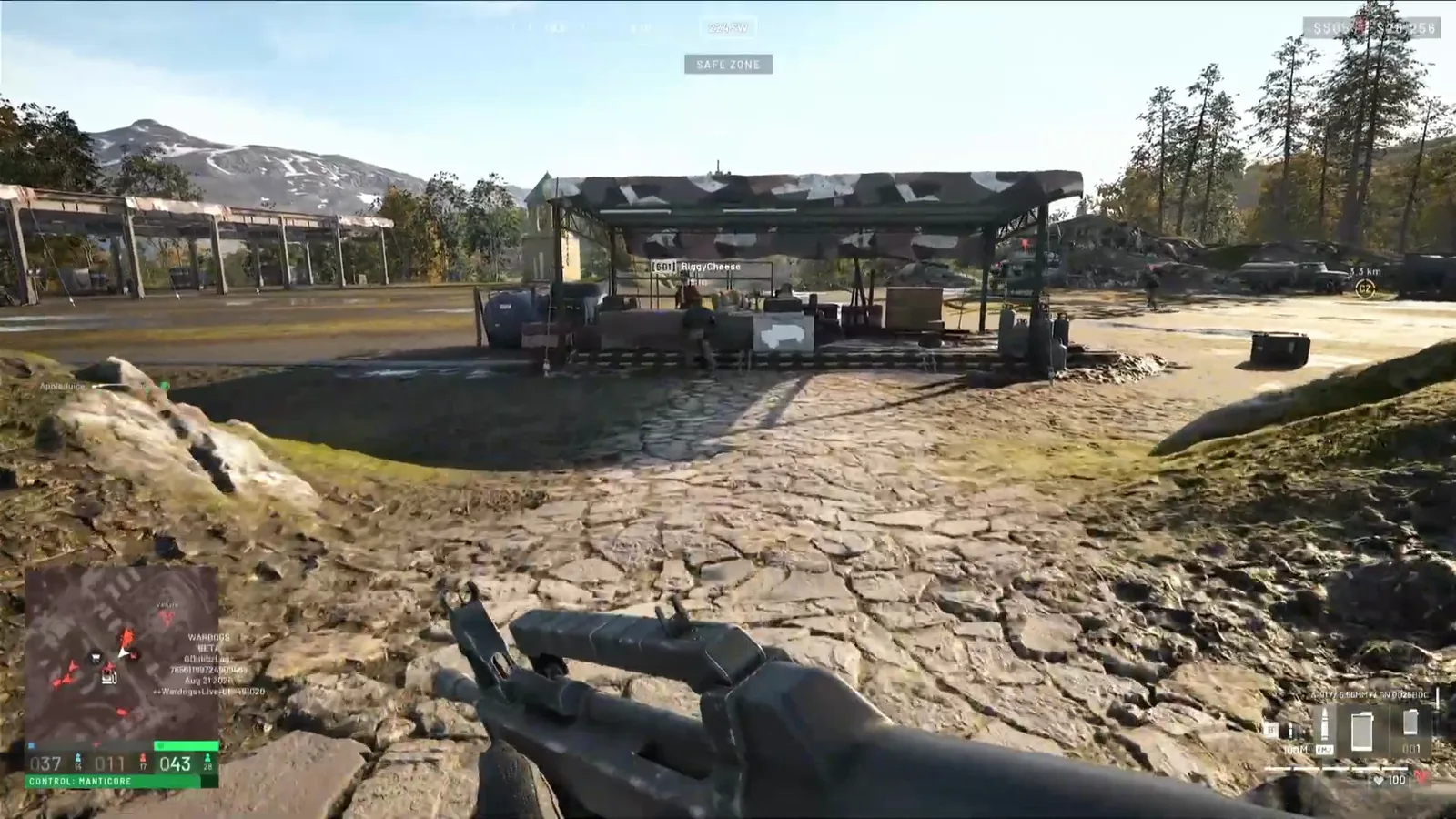 Step 1 (Timestamp: 00:16) — The canopy, the counter, the car sign. Our source runs to it holding a finished loadout: gear first, then a vehicle.
The order matters more than it looks. Our FOB building guide covers the equipment vendor, and that is where hammers, supplies and the FOB laptop itself come from — but a vehicle is not on that list, and a player who has never seen the second stall will happily browse the wrong menu for five minutes.
Watch the run to the vendor (00:16)
Step 2: Read the Tabs, Then Hover Before You Buy
The menu header says VEHICLE VENDOR, with two tabs across the top — LAND and AIR — and a row of filter chips under whichever tab you are on. On LAND the chips are ALL / ARTILLERY / TANK / TRANSPORT; on AIR they are ALL / COMBAT / TRANSPORT. A single Purchase prompt sits bottom-left.
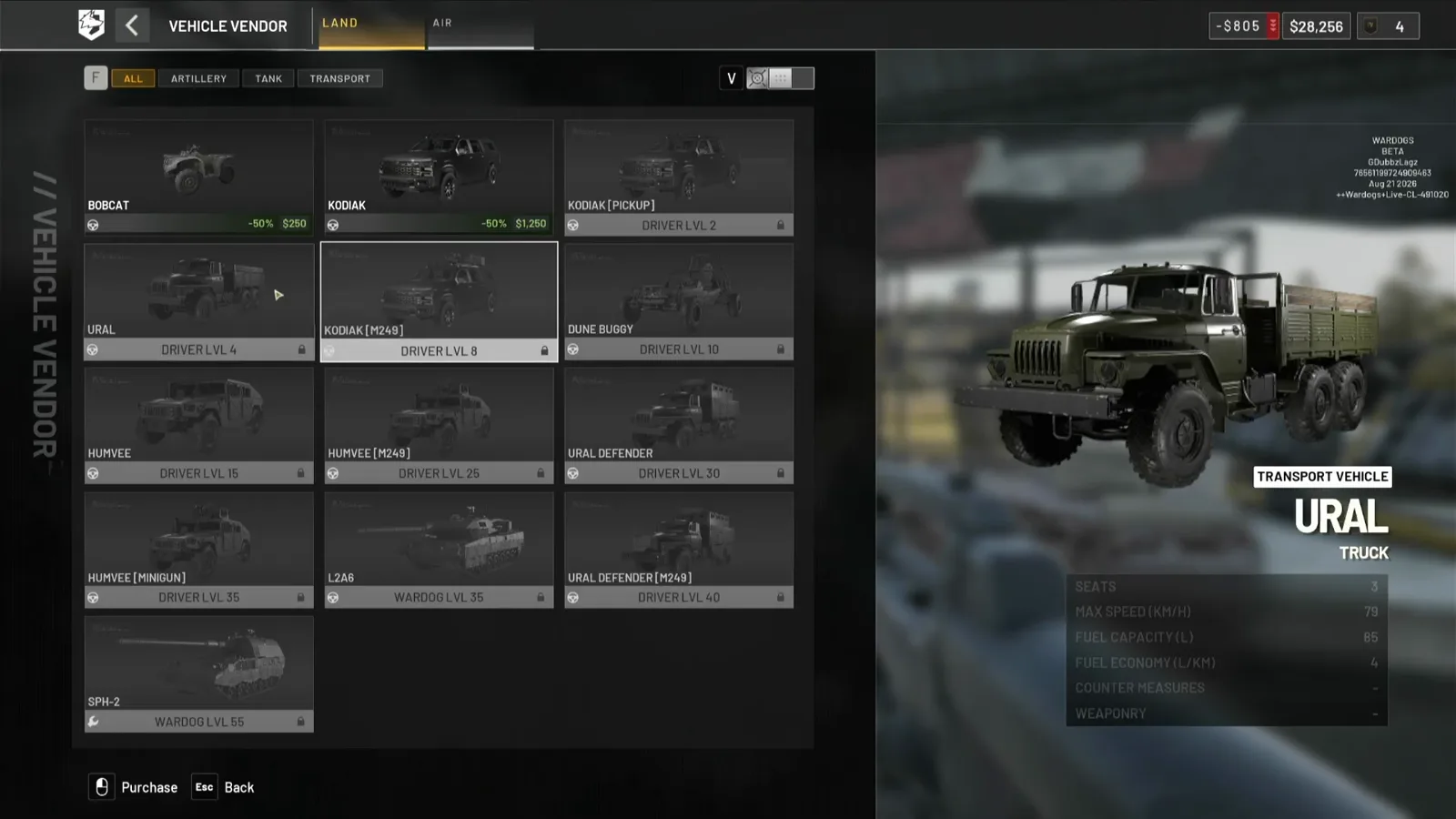 Step 2 (Timestamp: 00:26) — Cards you have earned show money; cards you have not show a level and a padlock. Hovering a locked card still tells you the price, so you can plan the grind.
The right-hand panel is the data card for whatever you are pointing at: class label, seat count, top speed, fuel capacity, fuel economy, countermeasures and weaponry. The tooltip that pops over the card adds the crew list, the weight, the price, a REWARDS line naming which class feeds off that vehicle, and the exact unlock requirement in plain words — on one helicopter card we captured it reads REACH PILOT LVL 20.
Watch the LAND grid and tooltips (00:26)
Step 3: Know Which Level Gates Which Purchase
There are three different gates in this one menu, and mixing them up is the most common reason a player thinks a vehicle is bugged.
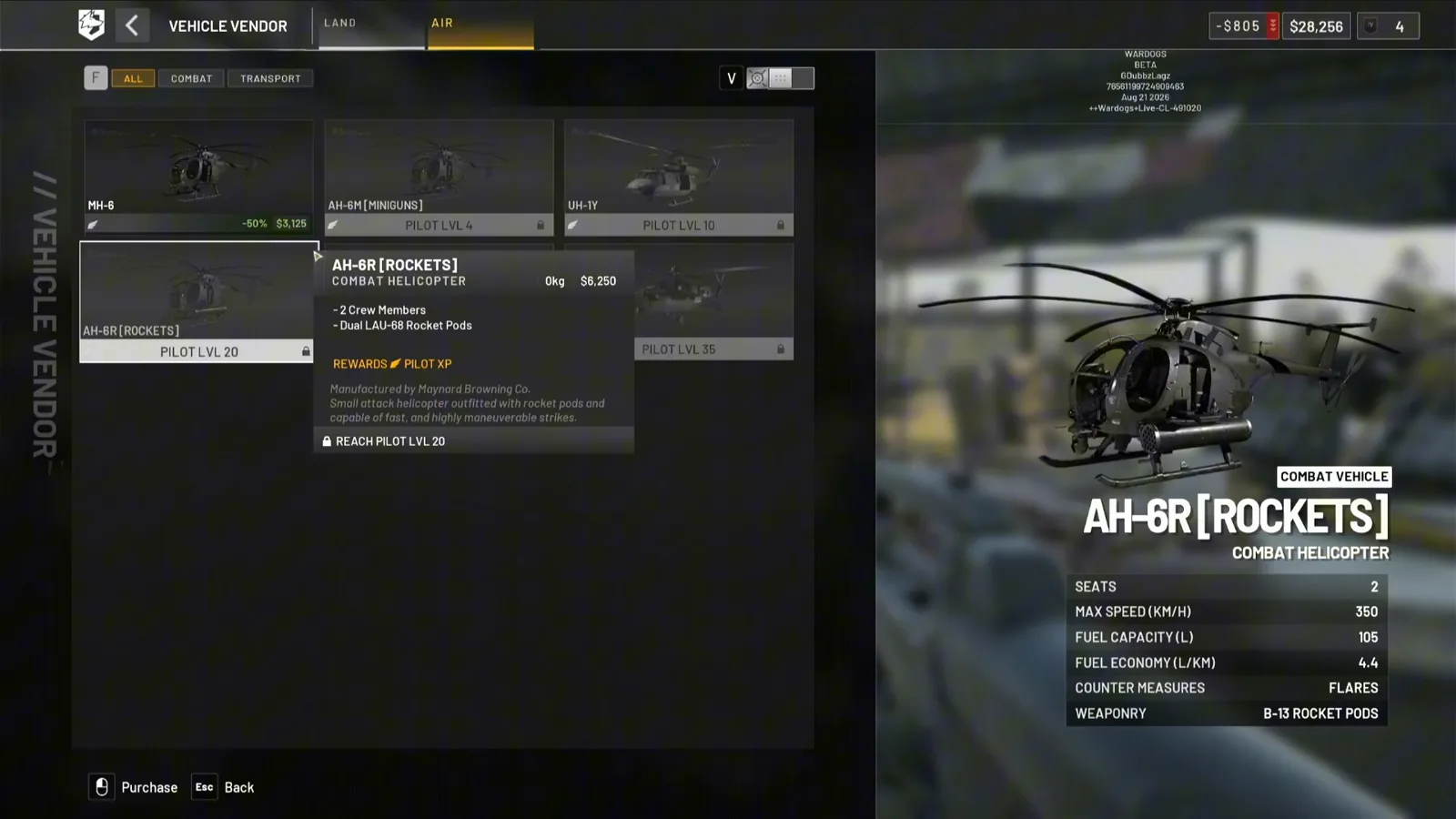 Step 3 (Timestamp: 00:40) — Switch to AIR and the gate track changes from Driver to Pilot. The MH-6 is the only card on this screen without a level lock; everything with guns fitted is gated.
- Driver level gates ground vehicles. In the launch-window screen the ladder starts at Driver 3 (URAL) and climbs through 6, 8, 10, 15, 18, 20, 25 and 30.
- Pilot level gates aircraft: Pilot 4 for the AH-6M minigun Little Bird, Pilot 10 for the UH-1Y, Pilot 20 for the AH-6R rocket variant, and a fifth card at Pilot 35.
- WARDOG level — the aggregate of all six classes — gates the SPH-2 self-propelled gun, and gated the L2A6 too until Season 1 moved it.
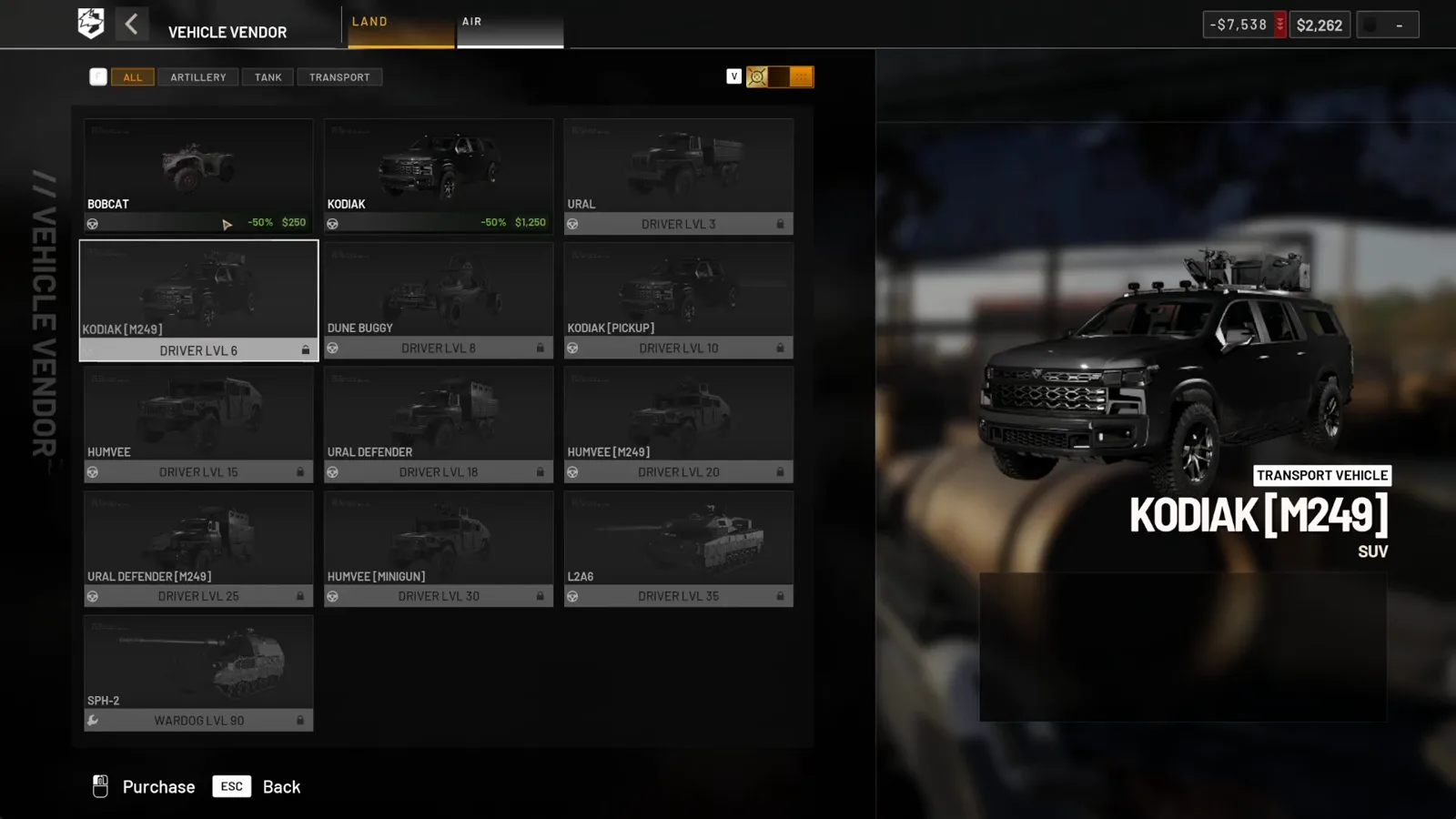 Step 3 (Timestamp: 00:36) — The same menu after Season 1. Ten of the eleven gated cards moved, and the L2A6 changed gate track, not just number.
Watch the AIR tab and Pilot gates (00:40) · Watch the post-Season-1 LAND list (00:36)
Step 4: Use the Filter Chips — They Settle an Argument
The chips are not just a convenience. Select TANK on the LAND tab and the grid returns exactly one card: the L2A6, at WARDOG 35 in the beta build. Nothing else is in that category.
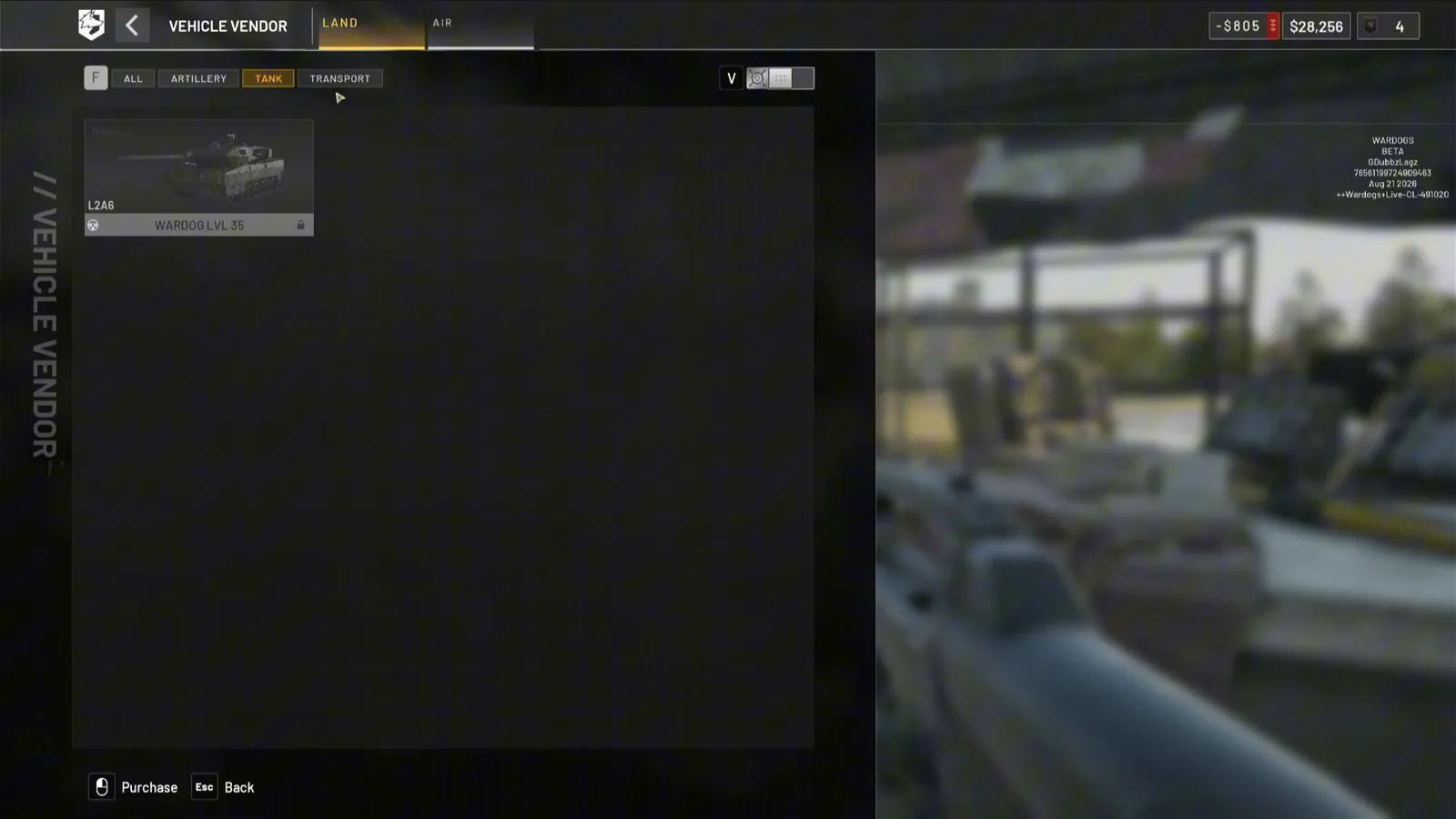 Step 4 (Timestamp: 00:30) — One card, one category. The vendor itself files the L2A6 as the tank.
Flip to the SPH-2’s own data card and it labels itself ARTILLERY VEHICLE / SPH-2 / ARTILLERY ARMORED VEHICLE, with L52 CANNON and M249 MACHINE GUN under WEAPONRY.
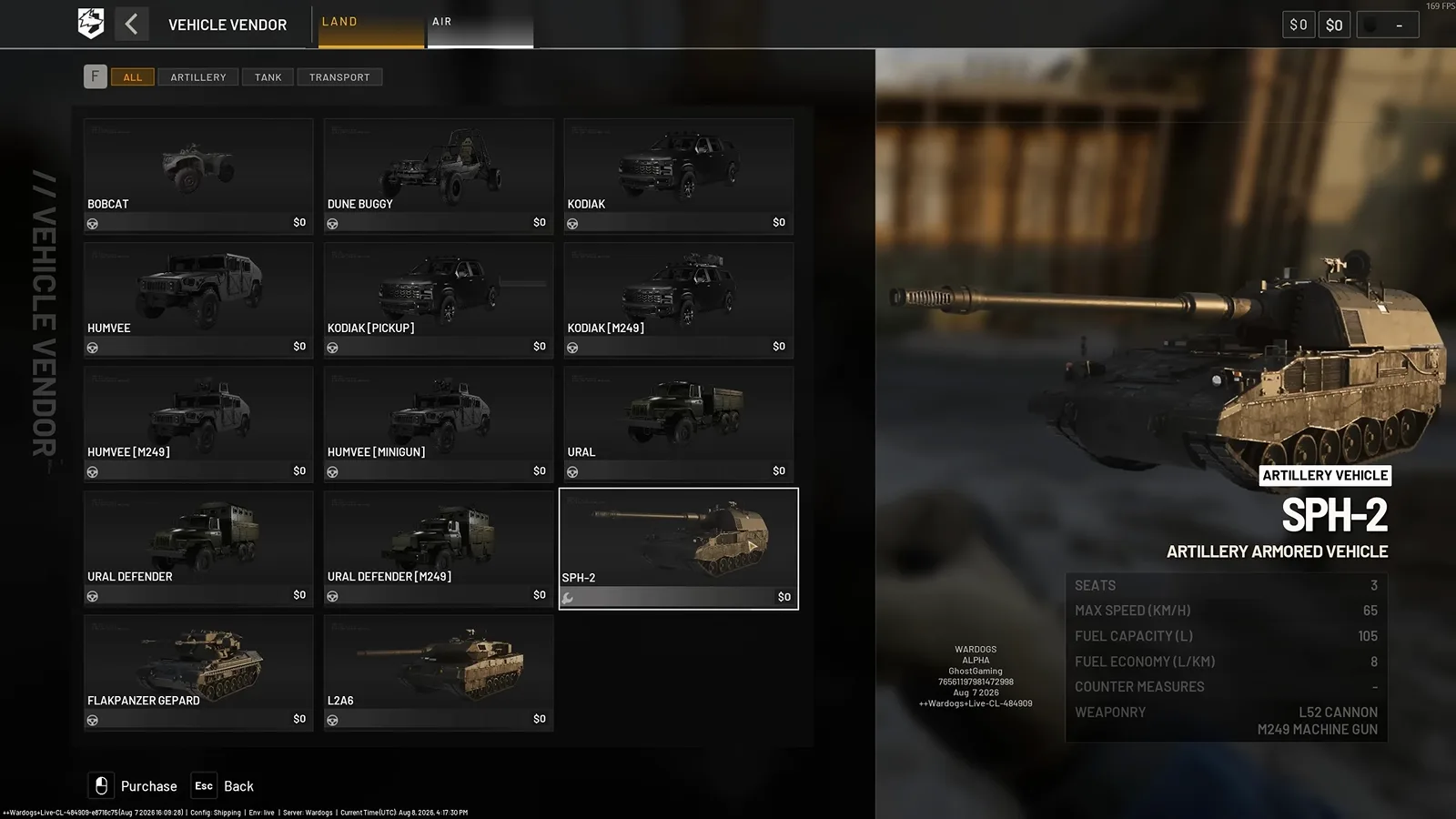 Step 4 (Timestamp: 11:00) — Recorded in the 7 August alpha test range, which is why every price on this screen reads $0.
Watch the TANK filter (00:30) · Watch the alpha vendor list (11:00)
Step 5: What It Costs, and What You Still Cannot See
The only vehicle prices we can read directly off a card are the cheap ones, and two independent recordings agree on them:
| Card | On-screen price | Where we read it |
|---|---|---|
| Bobcat (quad bike) | −50% · $250 | Beta 21 Aug 2026 and launch window — identical |
| Kodiak (SUV) | −50% · $1,250 | Beta 21 Aug 2026 and launch window — identical |
| MH-6 (Little Bird) | −50% · $3,125 | Beta 21 Aug 2026 |
AH-6R [ROCKETS] | $6,250 (tooltip, card locked) | Beta 21 Aug 2026 |
| URAL / Humvee / L2A6 / SPH-2 | Not readable — cards locked, tooltip not opened | — |
The −50% badge is worth one caveat. It sits beside the price on every card the player has already unlocked, so the figure printed is the discounted one. GhostGaming independently recalled the quad bike at “I believe $500”, which is exactly double — so doubling the card figure to recover a list price is a reasonable inference, but it is an inference, not something the menu states.
For the heavy metal, this page deliberately quotes nothing. Our artillery walkthrough verified a $400,000 one-time unlock plus $8,000 per deployment for the SPH-2 on a beta vendor card, and the Season 1 changelog raised the artillery unlock to $500,000 — so treat the 400k figure as beta-era and the 500k figure as the current official number. The L2A6 was documented at $500,000 to unlock with roughly $14,000 plus ammo per spawn, also beta-era. None of those numbers appear in any frame on this page.
One card disappeared between the alpha and the beta
The 7 August alpha LAND list contains fourteen entries, including a Flakpanzer Gepard anti-air tank. The 21 August beta list and the launch-window list both contain thirteen and neither shows it, and the TANK filter in the beta returns only the L2A6. Whether the AA tank moved to another category, was gated behind something the tester had not unlocked, or was pulled from the vendor is Unconfirmed — we can only report that it is on one screen and not on the two later ones.
Step 6: Press Purchase and Watch Where It Lands
There is no deployment timer and no call-in. The vehicle materialises on the ground inside the safe zone, near the stall and the fuel tanks, with two interaction prompts on it: Enter Driver with a seat counter, and Reposition Vehicle for shuffling it out of the way of your teammates.
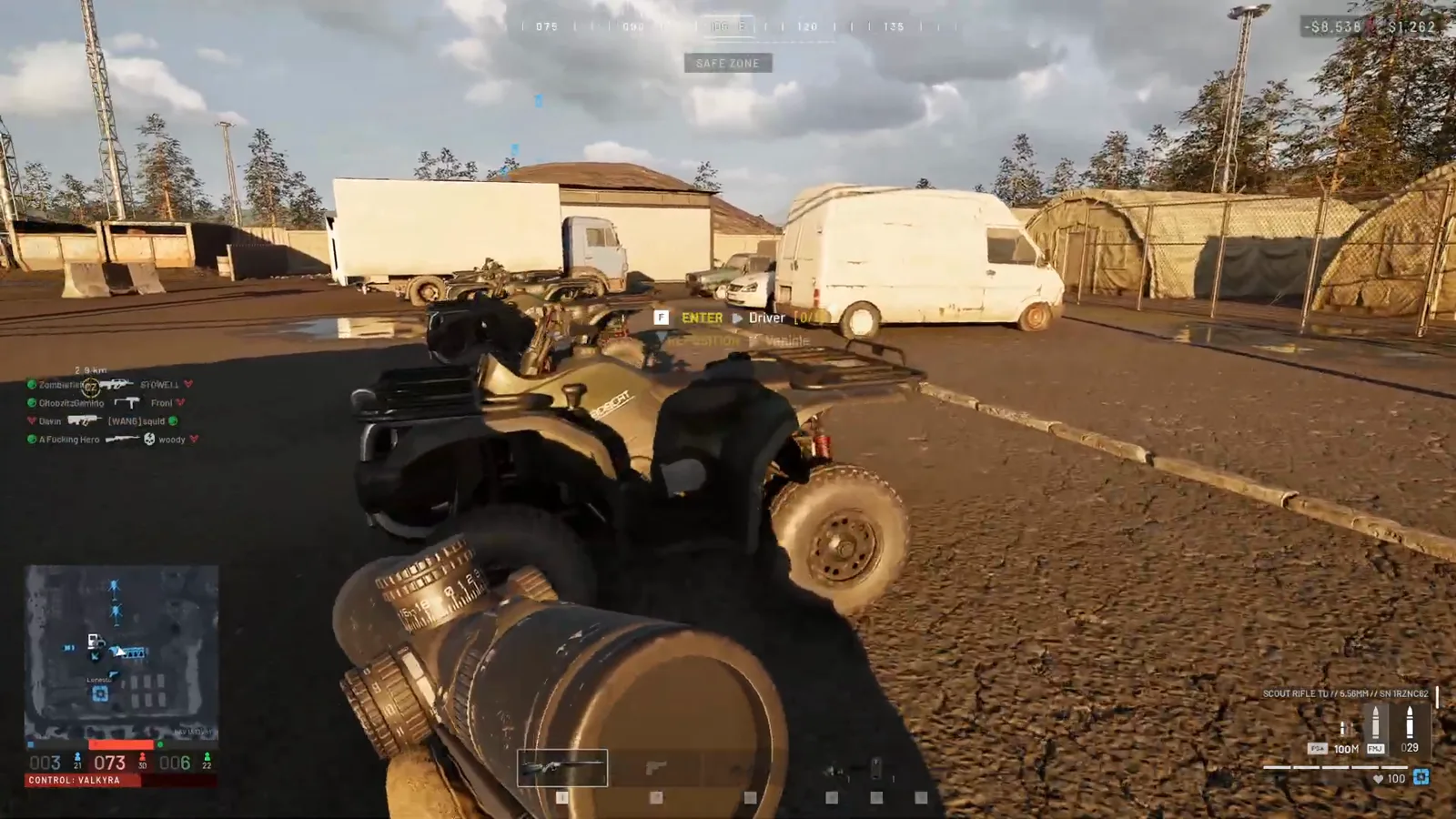 Step 6 (Timestamp: 00:50) — The money is gone the instant you click. Note the Reposition prompt: a vehicle parked badly in a crowded spawn blocks everyone, not just you.
Our artillery walkthrough additionally verified a horn beep confirming a heavy-vehicle buy landing under an awning beside the team spawn. Aircraft park in the same open ground — the beta footage shows two Little Birds sitting side by side near the fuel tanks under two different players’ nameplates, one per buyer.
Watch the spawned quad bike and prompts (00:50)
Step 7: Lock It, or Somebody Else Takes Your Seat
Once you are aboard, a keybind strip appears down the right of the HUD, and the line that matters is L UNLOCKED with the owner’s name under it — the name on the strip is whoever paid, not whoever is sitting in it.
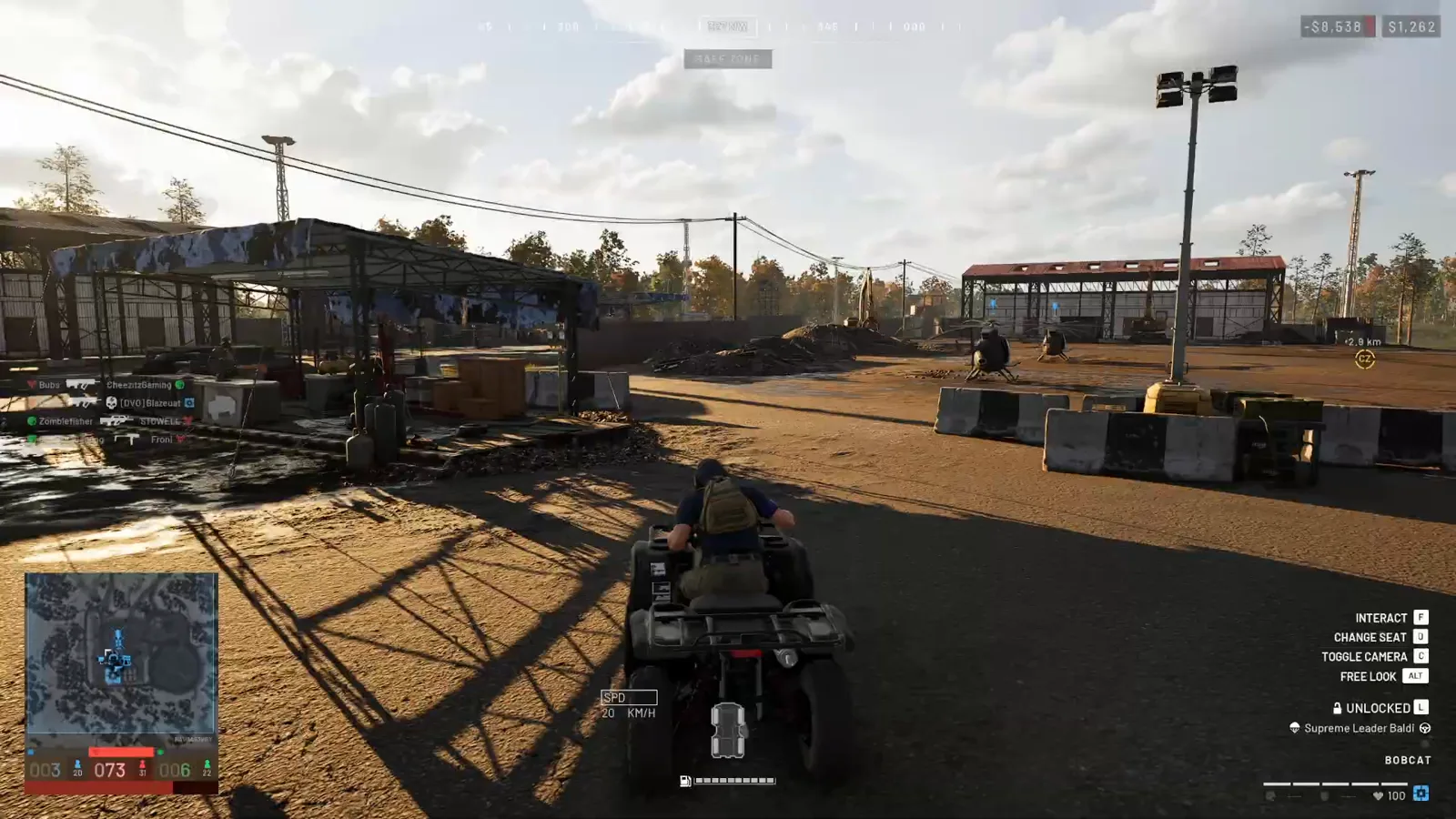 Step 7 (Timestamp: 00:54) — The padlock line is the theft switch, and the SPD box plus the fuel bar under the vehicle are your running costs counting down in real time.
The reason to press it comes straight from the source footage: “the person who buys it has to actually get into it and lock it, so you don’t have to worry about stealing your heli unless you unlock it and get out.” A helicopter you leave unlocked after a drop-off is a helicopter somebody else flies home.
Watch the lock line and fuel gauge (00:54)
Step 8: Budget the Running Costs, Not Just the Purchase
The card price is the entry fee. What actually drains the bank is everything after it: fuel burned every kilometre, damage that needs a wrench, and the ammo you reload from the vehicle’s own stock.
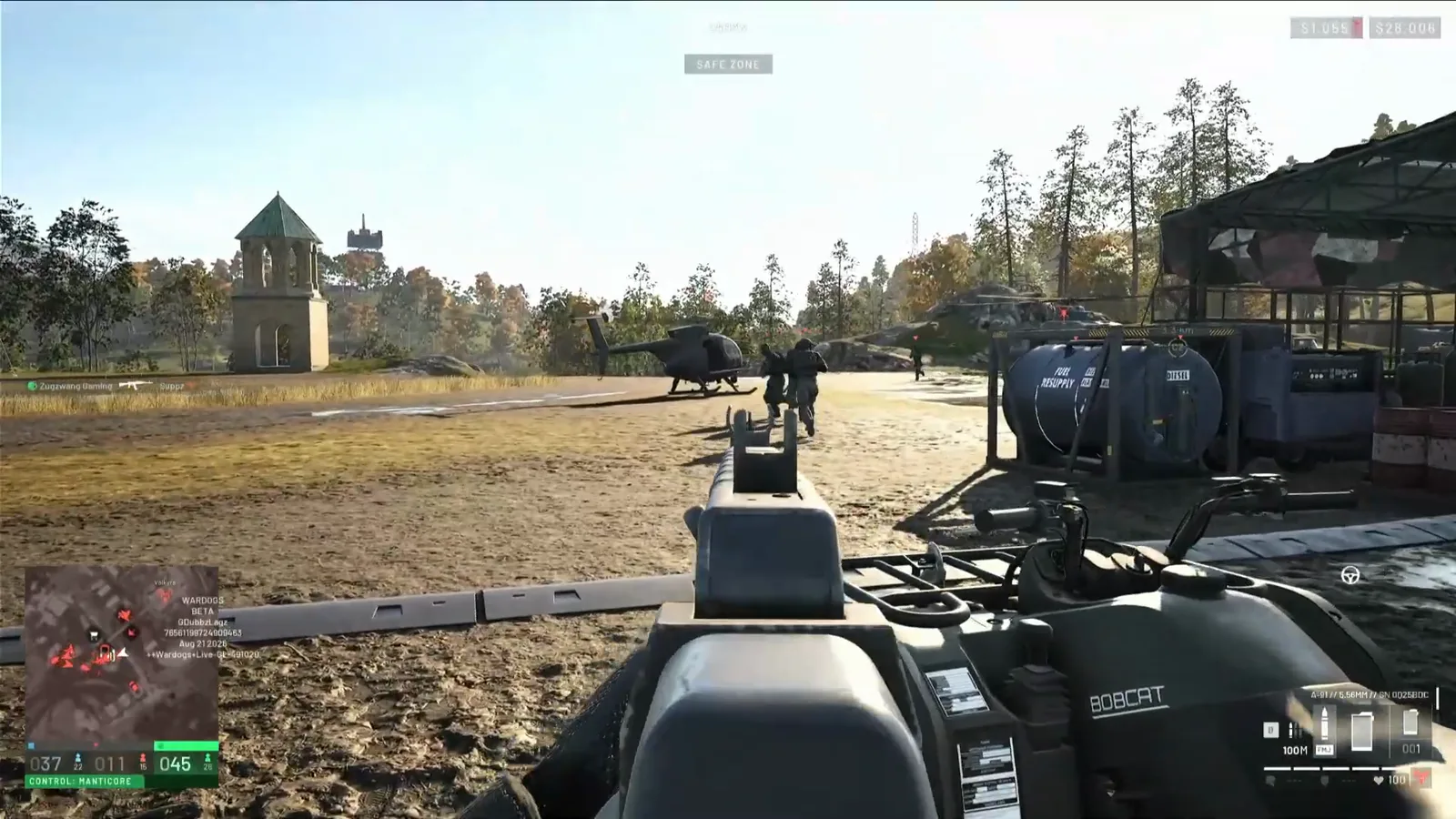 Step 8 (Timestamp: 00:57) — Those blue tanks at the edge of the spawn are the reason a vehicle run is never free. Fuel capacity and economy are printed on every vehicle’s data card.
Three things to carry in your head. Fuel is finite on every motorised vehicle and the gauge sits under the vehicle while you drive — the vehicles guide covers burn rates and what happens at empty. Resupply comes from the vehicle itself: park it in a safe zone and B opens its Buy Ammo / Supplies screen, documented in our ammo guide, while pallets of fuel and mechanical stock get shipped forward through the logistics loop. Recovery is the tick-20 rule: lose the vehicle before tick 20 and the purchase is gone; survive past it and most of it comes back. That maths is worked through once already in the vehicles guide — this page will not re-derive it.
Watch the fuel tanks at the spawn (00:57)
Vehicle Purchase Reference
| Item | Value | Status |
|---|---|---|
| Vendor | Vehicle Vendor (separate stall, white car pictogram, inside the safe zone) | Verified on screen |
| Tabs | LAND · AIR | Verified on screen |
| LAND filter chips | ALL · ARTILLERY · TANK · TRANSPORT | Verified on screen |
| AIR filter chips | ALL · COMBAT · TRANSPORT | Verified on screen |
| Ground gate | Driver level, from Driver 3 (URAL) | Verified on screen, launch window |
| Air gate | Pilot level, from Pilot 4 (AH-6M) | Verified on screen, beta 21 Aug 2026 |
| L2A6 gate | Driver 35 (launch) — was WARDOG 35 in the 21 Aug beta | Verified on screen |
| SPH-2 gate | WARDOG 90 (launch) — was WARDOG 55 in the 21 Aug beta | Verified on screen |
| Bobcat price | $250 with a −50% badge | Verified on screen, beta + launch |
| Kodiak price | $1,250 with a −50% badge | Verified on screen, beta + launch |
| MH-6 price | $3,125 with a −50% badge | Verified on screen, beta |
AH-6R [ROCKETS] price | $6,250 · 2 crew · dual LAU-68 pods · 350 km/h · 105 L | Verified on screen, beta |
| Spawn behaviour | Immediate, inside the safe zone; Enter Driver + Reposition Vehicle | Verified on screen |
| Theft control | L toggles Locked/Unlocked; owner’s name shown on the strip | Verified on screen |
| SPH-2 unlock / deploy | $400,000 + $8,000 per deployment (beta) → $500,000 unlock after Season 1 | From our artillery page + official changelog; not in these frames |
| L2A6 unlock / spawn | ~$500,000 + ~$14,000 per spawn (beta-era) | From our XP guide; not in these frames |
Buying a Vehicle: Rules of Thumb
- Check you are in the right shop first. No vehicle exists on the equipment vendor. If your screen shows hammers and ammo boxes, walk to the stall with the car sign — the gear side of it is covered in our FOB building guide.
- Hover locked cards, do not skip them. The tooltip gives you the price, the crew count and the exact
REACH <CLASS> LVL nline, which is how you plan a grind instead of discovering it. - Buy the cheap transport before you can afford the heavy metal. A $250 quad bike or $1,250 Kodiak pays for itself ferrying squads, and the REWARDS line tells you which class XP it feeds — the fastest route is in our XP leveling guide and the cash maths is in our money-making guide.
- Do not let a vehicle sit unlocked. The buyer’s name is on the HUD strip for a reason. Enemy teams specifically hunt spawn vehicles — see the FOB attack guide.
- Price the whole life, not the card. Fuel, repair and resupply all bill separately, and the tick-20 refund only covers the purchase. The economics are in the vehicles guide.
- Re-read the gates after every patch. Season 1 moved ten of the eleven gated LAND cards, changed which track the L2A6 gates on, and the changelog we mirror does not list every one — our own two screenshots caught a minigun-Humvee card move from Driver 25 to Driver 20 that the official line never names. Note too that the changelog uses internal names the vendor does not show (“URAL Covered”, “Kodiak Flatbed”, “URAL Attack”), which is a large part of why the community keeps arguing about which card is which. Treat any static wiki number, including ours, as dated: Season 1 patch notes.
- Never trust a price from a test range. The alpha footage on this page shows every vehicle at $0 because the test-range vendor is free. GhostGaming’s own commentary says so out loud, and the same trap produced the $0 ammo prices in our ammo guide.
Purchase mechanics, tab structure, filter chips and the lock line were read directly off the Vehicle Vendor in yoGDubbz’s 61-second menu walkthrough (build stamp WARDOGS BETA, Aug 21 2026, CL-491020), Quick Tips’ launch-window get-a-vehicle clip, and GhostGaming’s alpha vehicles overview (build stamp WARDOGS ALPHA, Aug 7 2026, CL-484909) — the last used for the SPH-2’s self-labelling data card only, since its test-range prices are all $0. The pre-Season-1 versus launch gate comparison is our own card-by-card reading of two vendor screens and is what lets us name the L2A6 as the Heavy Tank and the SPH-2 as the Artillery with confidence. Unlock and per-deployment prices for the heavy vehicles are quoted from our existing pages and the official changelog, not from these frames, and are stamped beta-era where they apply. Early Access moves fast: re-shoot this menu after every balance patch before trusting the level column.
Related Articles
guides
WARDOGS Update 0.2.0 Patch Notes: Season 2 Player Guide
WARDOGS Update 0.2.0 (Season 2), announced 2026-10-15: faster XP, softer calibers, lower logistics pay, new guns and vehicles — key old→new numbers and stale guides.
guides
WARDOGS Update Time: Every Patch & Maintenance Window
Every official WARDOGS patch and maintenance window: exact UTC start time, planned downtime, how much notice players got, and what it is in your time zone.
guides
WARDOGS Player Count: Steam Charts, Peak and Is It Dead?
How many people play WARDOGS? Dated Steam readings, why trackers disagree, the 428,666 vs 402,686 peak gap, beta-weekend counts and whether the game is dead.
Was this helpful?
Thanks for the feedback!